
 Commands
bin_rmkeybin
RMKEYBIN
 Apply for Redis Developer Course
|
 Redis Regular Inspection / Technical Support
|
 Redis Enterprise Server
|
|---|
Delete keys in the recycle bin with rmkeybin
Usage is rmkeybin key. Returns the number of deleted keys.
You can specify multiple keys to delete. Because they are deleted from the recycle bin, they cannot be recovered.
Example
| Command> | rmkeybin key1 key2 key3 |
| Result> | 3 |
| Command> | select * from bin.key*; |
| Result> | ERR no such key: bin.key* |
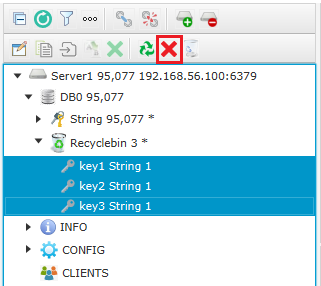
The following is the screen in the redisAdmin Recyclebin where you select key1, key2, and key3 and click the rmkeybin icon to delete them.
Syntax
RMKEYBIN key1 [key2 ...]
- Available since Enterprise version 7.3.3.
- Time complexity is O(N). N is the number of keys to delete.
| << REUSE | RMKEYBIN | FLUSHRECYCLEBIN >> |
|---|
Email
답글이 올라오면 이메일로 알려드리겠습니다.



