bin_intro
Recyclebin Introduction
Recyclebin
The recycle bin feature is supported from redisGate Enterprise version 7.3.3.
When you delete a key with RMKEY, it goes into the recycle bin.
Keys in the recycle bin can be restored with REUSE.
When you delete a key with DEL, it is removed completely. It cannot be recovered.
There is one recycle bin per DB.
Example
| Command> | set key1 Hello |
| Result> | OK |
| Command> | rmkey key1 |
| Result> | 1 |
| Command> | get key1 |
| Result> | (nil) |
| Command> | reuse key1 |
| Result> | OK |
| Command> | get key1 |
| Result> | Hello |
Recyclebin Related commands
- RMKEY: Deletes a key.
It goes into the recycle bin. Multiple keys can be selected.
- REUSE: Restores a key from the recycle bin. Multiple keys can be selected.
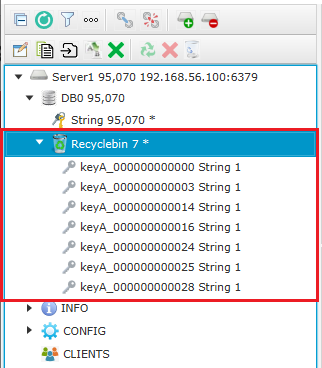
The image below shows the recycle bin in the
redisAdmin tool.
In the redisAdmin tool you can delete and restore with icon clicks.
- RMKEYBIN: Deletes a key in the recycle bin.
It cannot be recovered.
- FLUSHRECYCLEBIN:
Deletes all keys in the recycle bin (empties the recycle bin). They cannot be recovered.
- FLUSHRECYCLEBINALL:
Empties all recycle bins on the server.
- RECYCLEBIN:
Shows recycle bin information.
- SELECT: You can query keys in the recycle bin with SQL SELECT.
select * from bin.*;
select * from bin.key*;
select * from bin.* where key glob 'key*';
select * from bin.* where key in ('key1','key2');
- DELETE: You can delete keys in the recycle bin with SQL DELETE.
delete from bin.*;
delete from bin.key*;
delete from bin.* where key glob 'key*';
delete from bin.* where key in ('key1','key2');
- Functions: Function list available in SQL.
valcnt(key): Returns the number of values.
memory(key): Returns the amount of memory used by the key and value.
type(key): Returns the datatype of the value.
encoding(key): Returns the encoding type of the value.
updatetime(key): Returns the last update time of the key (here, the time RMKEY was executed).

 Commands
 Apply for Redis Developer Course
 Redis Regular Inspection / Technical Support
 Redis Enterprise Server



