
 Commands
bin_rmkey
RMKEY (remove)
 Apply for Redis Developer Course
|
 Redis Regular Inspection / Technical Support
|
 Redis Enterprise Server
|
|---|
Delete a key with rmkey (remove key)
Usage is rmkey key. Returns the number of deleted keys.
You can specify multiple keys to delete.
The rm time is stored in updatetime.
Example
| Command> | rmkey key1 key2 key3 |
| Result> | 3 |
| Command> | select * from bin.*; |
| Result> | 0) key 1) key1 2) key2 3) key3 |
| Command> | select key, updatetime(key), memory(key), type(key) from bin.*; |
| Result> | 0) key|updatetime(key)|memory(key)|type(key) 1) key1|2022-06-08 14:50:08|62|string 2) key2|2022-06-08 14:50:08|62|string 3) key3|2022-06-08 14:50:08|62|string |
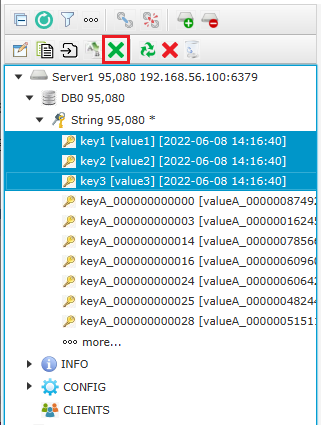
The following is the screen in the redisAdmin tool where you select key1, key2, and key3 and click the blue X icon to delete them.
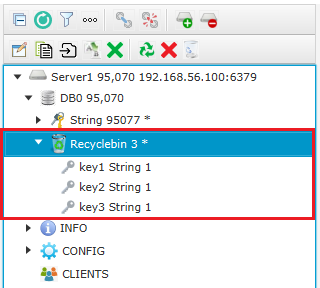
The following screen shows the recycle bin in redisAdmin.
Syntax
RMKEY key1 [key2 ...]
- Available since Enterprise version 7.3.3.
- Time complexity is O(N). N is the number of keys to delete.
| << Intro | RMKEY | REUSE >> |
|---|
Email
답글이 올라오면 이메일로 알려드리겠습니다.



