
 Edu/Support
k8s_intro_1
Redis on Kubernetes Deployment Guide ①
Introduction to Kubernetes
This is redisGate. Since 2014 we have shared Redis installation and operations know-how
on dedicated Redis servers (bare-metal, VM) and in Docker environments.
In recent enterprise projects, requests to run not only applications but also in-memory databases
such as Redis as Kubernetes Pods have grown quickly.
From a Redis engineer or DBA point of view, the first question is often:
"Is it safe to run a stateful database on Kubernetes Pods that come and go so easily?"
This guide is a field record of how we answered that question: we built Redis-Cluster and Redis-Sentinel
on Rocky Linux 9.5 (air-gapped) with K3s and Redis 8.8.2, and fully verified failover.
(📝 Kubernetes-Redis install/test: July–September 2026)
☸️ How the runtime environment has changed
🗄️ Physical Server --→ 💻 Virtual Machine ----------→ 📦 Container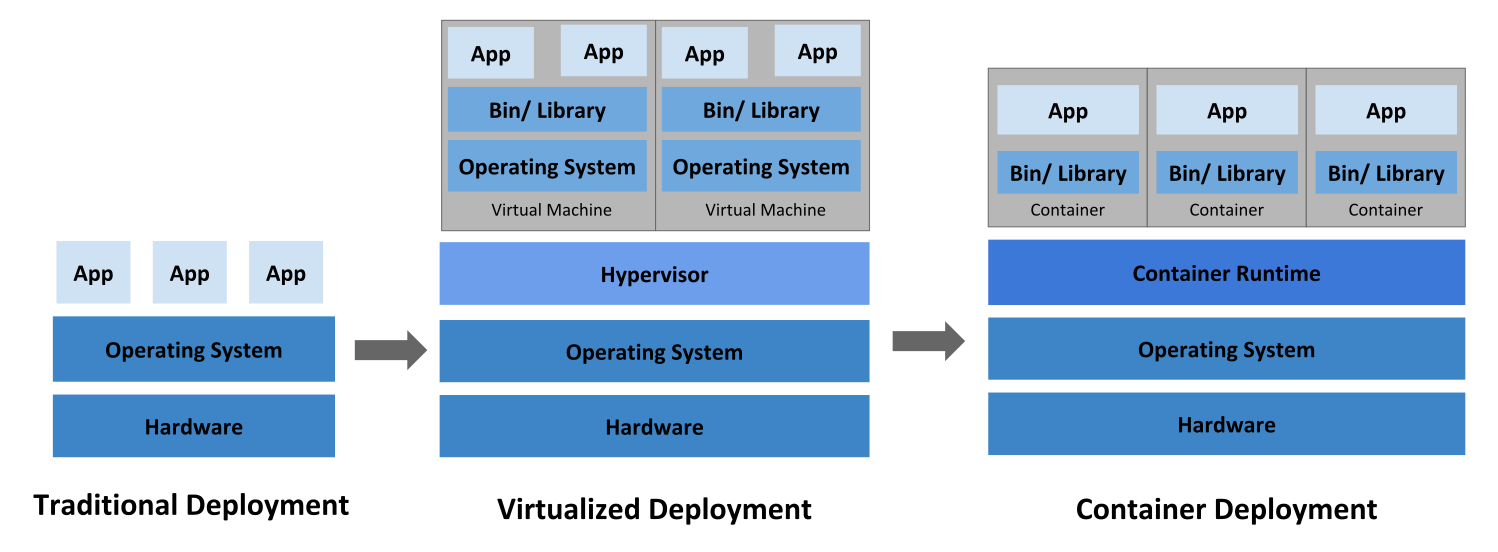
The diagram does not mean that every deployment environment changes in a single, uniform way.
One characteristic of a Pod is that it is ephemeral (short-lived, one-shot).
The databases we discuss here are neither short-lived nor one-shot.
Disk-based databases such as MySQL and PostgreSQL are permanent.
Redis also writes configuration changes to its conf file when state changes.
And it writes data to the AOF file in near real time.
So Redis, even as an in-memory DB, is also 'permanent'.
Kubernetes supports this with StatefulSet so that 'permanent' software can run on the platform.
More and more projects also take Kubernetes as the default deployment architecture.
On the Redis side, redis-sentinel has supported Kubernetes Pods since Redis 6.2.0 (February 2021),
and redis-cluster since Redis 7.0.0 (April 2022).
From redisGate experience, about 10% of deployments are on physical servers, 80% on VMs,
and 10% on Docker/Kubernetes.
It is time for Redis to be built for Kubernetes as well.
☸️ What is Kubernetes? (brief overview)
Kubernetes (*K8s) is an open-source container *orchestration platform that coordinates
automatic deployment, scaling, and management of containerized applications.
In a traditional server environment, if Redis died an engineer had to restart the process by hand.
With Kubernetes you declare the 'desired state' in a YAML file;
if a process goes down, Kubernetes restarts it (self-healing) and keeps availability.
Since around 2003, Google has run a large-scale internal cluster manager called Borg for
Search, Gmail, YouTube, and other infrastructure.
Building on experience of launching more than *2 billion containers a week,
Google open-sourced Kubernetes in June 2014.
Version 1.0 followed in July 2015, and the project is now governed by the
*CNCF (Cloud Native Computing Foundation).

Core features
- Self-healing: if a container suddenly stops (down), Kubernetes brings it back to the desired state or replaces it with a new one.
- Auto-scaling: if traffic spikes, Kubernetes increases the number of replicas; if traffic drops, it scales back down. ➡ Given how Redis works, we will not use auto-scaling.
- Load balancing: work is spread across instances so it does not pile up on one place. ➡ Given how Redis works, we will use Redis's own load-balancing features.
*Terms: Kubernetes, K8s, Orchestration, 2 Billion, CNCF
- Kubernetes: Kubernetes comes from Greek for 'helmsman' or 'pilot'.
Like someone who steers a ship, Kubernetes sets the course for a complex container environment.
Searching a modern/ancient Greek dictionary for 'Kubernetes' often returns nothing; the ancient Greek word 'κυβερνήτης' (kybernetes) does. It does mean helmsman, steersman, or navigator.
Also: it is the root of 'cyber'. The ancient Greek 'κυβερνήτης' — to steer and control a ship — later became the root of cybernetics.
The prefix cyber- that we use every day started from this one word for 'helmsman'. Kubernetes official docs present this etymology, and the logo is a ship's wheel (helm). - K8s: a numeronym for 'Kubernetes' (eight letters between K and s).
K3s is a lightweight Kubernetes distribution from Rancher (now SUSE), aimed at edge, IoT, and smaller servers. It ships as a single binary, is simple to install, and is fully compatible with standard Kubernetes.
Where does the name k3s come from? Like Kubernetes / k8s, k3s shortens the letters between 'k' and 's', and signals a goal of about half the size of k8s. - Orchestration: originally a music term for arranging and scoring for an orchestra — combining instruments with different characters into one piece. IT borrowed the metaphor for coordinating many different components as one system.
- 2 Billion:
This figure was published by Google itself when describing the operational scale of Borg,
the internal container orchestration system that Kubernetes grew out of.
- Background: it appears in Google's official blog post and technical material
(the Borg paper) when Kubernetes was open-sourced in June 2014.
- Quote: "Everything at Google runs in containers. Google launches over 2 billion
container instances each week."
(Every Google service runs in containers, and Google starts more than 2 billion
container instances each week.)
- How can 2 billion start in a single week?
That is about 280 million a day, or more than 3,300 new containers per second
being created and torn down. How is that possible?
① Scale of Google's services: Search, YouTube, Gmail, Maps, and other services used in real time by billions of people all run on containers.
② Autoscaling (scale-in / scale-out): When traffic rises, the number of containers jumps up (scale-out); when traffic falls, containers are destroyed immediately (scale-in).
③ Short-lived ephemeral work: Batch jobs, analytics, search indexing, and CI/CD builds often live for seconds or minutes and are deleted when the work is done. At Google's scale, tens of thousands of these one-shot containers are created and destroyed every second.
④ Self-healing (automatic restart): Containers that die from node failure or failed health checks are recreated continuously, 24 hours a day.
- Background: it appears in Google's official blog post and technical material
(the Borg paper) when Kubernetes was open-sourced in June 2014.
- CNCF (Cloud Native Computing Foundation): A global non-profit that advances cloud-native technology and its ecosystem. It was founded in 2015 to take Kubernetes from Google, and it sits under the Linux Foundation.
- Cluster: 'Cluster' is used widely in computing. Redis-Cluster means Redis built with Redis's own clustering (the product).
- Node / Pod: In Kubernetes, a node is something like a VM, and a Pod is the container unit that runs Redis. In Redis, a node means a Redis instance.
☸️ What is a Pod?
A Pod is the smallest deployable unit you can create and manage in Kubernetes.
Four core characteristics of a Pod
- Shared resources (network & storage)
- ① Shared IP: a Pod is given a single unique IP. Every container in the Pod shares that IP and can talk to each other very quickly over 'localhost'.
- Shared volumes: containers in the Pod can read and write the storage (volumes) attached to the Pod.
- ② Same-node scheduling: containers that belong to one Pod are always scheduled and run together on the same worker node in the cluster.
- ③ Ephemeral lifecycle and identity:
- Pods are not permanent. If an error occurs or a node goes down, the Pod is deleted and recreated. The Pod IP changes as well.
- When you run Redis, you must keep a stable Pod identity with StatefulSet plus a Headless Service. From Redis 7.0 onward, Redis can keep running even if the Pod IP changes.
- Ephemeral means short-lived, fleeting. It is used when something exists only briefly and then disappears.
- Permanent: lasting, unchanging
- ④ Default: 1 Pod = 1 container
- The most common pattern is one application container per Pod.
- You can still bundle helper containers (sidecars) when you need them.
Cautions when running Redis in a Kubernetes Pod
Kubernetes is built around ephemeral (stateless) behavior, but Redis is a stateful application. When you run it in Pods, pay attention to these five points.
- ① Workload object (StatefulSet is required)
- Use 📍StatefulSet, not Deployment.
- Redis Cluster and Sentinel need a stable network identity (Pod name and DNS) on each node for failover and reconnection to work.
- ② Storage (PV) and IOPS for AOF persistence
- With AOF enabled, mount a 📍PersistentVolumeClaim (PVC) so data survives Pod restarts.
- AOF writes (fsync) happen often. If disk I/O becomes a bottleneck, overall Redis performance (even in-memory processing) drops. Prefer a fast NVMe/SSD StorageClass.
- ③ Pod anti-affinity
- If Master and Replica Pods land on the same physical worker node, a node failure takes both down and breaks high availability.
- Use 'podAntiAffinity' so Master/Replica Pods are forced onto different nodes.
- ④ Memory settings (memory limit & maxmemory)
- Leave headroom between the Kubernetes memory limit and Redis maxmemory.
- If Redis 'maxmemory' equals the Pod memory limit, AOF child process creation (fork) or memory fragmentation can make Kubernetes OOMKill the Pod immediately.
- Recommendation: set Redis 'maxmemory' to 📍50%–90% of the Pod memory limit.
• Memory over 10GB and heavy write/update/delete traffic: 50%–60%
• Memory over 10GB but mostly reads: 70%–80%
• Memory under 1GB and light writes: 80%–90%
• For the safest operations, if maxmemory is 1GB, set the Pod memory to 2GB
(twice maxmemory)
- ⑤ Kernel parameters and host settings
- Redis uses the 'fork()' system call for AOF rewrite and BGSAVE.
- If the host node's 'vm.overcommit_memory' is not set to '1', background save can fail.
- 📍Set kernel parameters on the host node (OS) in advance.
- vm.overcommit_memory = 1, net.core.somaxconn=8192, disable Transparent Huge Pages (THP), and so on
📦 Why wrap containers in a Pod instead of running them directly?
Because some workloads need tightly coupled helpers that a single container cannot cover well.
For example, you may attach a log collector or security proxy next to a main web-server container.
That is the sidecar pattern.
| Part | Role |
|---|---|
| Main container | Serves the web application (e.g. Nginx, Node.js) |
| Sidecar container | Periodically collects logs from the main container and sends them to an external server |
Those two containers must share a local filesystem or the 'localhost' network to work correctly.
Kubernetes groups them as a Pod so they always live and die together on the same node.
We do not recommend putting Redis and Sentinel in the same Pod
as a sidecar pattern.
Sentinel is an independent instance. It should run in a separate Pod.
🔗 See the "Kubernetes Redis-Sentinel Sidecar" page for details.
Why use a controller instead of creating Pods by hand
In production you rarely create Pods one by one. Pods are deleted and recreated easily, so you usually use a controller such as Deployment or StatefulSet to keep replica count, rolling updates, and recovery automated.
☸️ Deployment vs StatefulSet
In Kubernetes, Deployment and StatefulSet are both workload controllers that manage a set of Pods and keep the desired count. The decisive difference is: does each Pod need state and a stable identity (name / IP / device)?
- 1. Deployment
Deployment is the standard controller for stateless applications.
- Trait: Pods are identical and interchangeable.
- Pod name: a random hash is appended. (e.g. `my-web-58997b6b96-abc12`)
- Create/delete order: many Pods are created or deleted in parallel, with no order.
- Typical use: web servers, API servers, frontends — apps where replacing one Pod with another is fine.
- 2. StatefulSet
StatefulSet is the controller for stateful applications.
📍Use StatefulSet for Redis.- Trait: each Pod has a stable, persistent identity (name, network, storage).
- Pod name: a fixed sequential index from 0. (e.g. `redis-0`, `redis-1`, `redis-2`)
- Even after a Pod dies and restarts, the name (`redis-0`) and stable DNS stay the same. - Create/delete order: created one by one in order (`0` -> `1` -> `2`), and deleted in reverse order.
- Dedicated storage (PVC templating): each Pod gets its own PV 1:1. If the Pod moves to another node, it finds and remounts its own disk.
- Typical use: Redis, databases (MySQL, PostgreSQL), Kafka, and other distributed systems that need order or a fixed identity between nodes.
At a glance (Deployment vs StatefulSet)
| Item | Deployment | StatefulSet |
|---|---|---|
| Target application | Stateless | Stateful |
| Pod identity (name) | Random string (e.g. 'app-abc12') | Sequential index (e.g. 'redis-0', 'redis-1') |
| Network identity | Not distinguishable when IP changes (replaceable) | Stable Headless DNS ('redis-0.service...') |
| Disk (PV) binding | Pods may share storage | Dedicated disk 1:1 per Pod |
| Create/deploy | Parallel | Sequential (Pod 1 after Pod 0 is ready) |
| Examples | Nginx, Node.js web app, Spring API | Redis, MySQL Cluster, ZooKeeper |
☸️ What is a PersistentVolumeClaim (PVC)?
In Kubernetes, a PVC (PersistentVolumeClaim) is the request / ticket a user (Pod) sends: "Give me storage (disk) with this spec." The easiest way to understand it is to look at the relationship between the real disk (PV) that holds Redis data and the PVC.
- 1. PV vs PVC (a housing-contract analogy)
Kubernetes splits infrastructure (disk) management from developer (Pod) requests using PV and PVC.
• PV (PersistentVolume):
- Real disk capacity an infrastructure admin has already provisioned in the cluster (e.g. AWS EBS 100GB, NVMe SSD 500GB, SAN storage).
- Analogy: an actual building/room listed on the market
- A request from a developer or Pod: "I need 20GB, fast read/write, and durable storage."
- Analogy: a tenant's requirements sheet (studio, 20GB, move-in request)
- 2. Why is a PVC required for stateful apps like Redis?
As noted earlier, the filesystem inside a Kubernetes Pod is ephemeral. If the Pod restarts or moves to another node, local data (redis.conf, AOF files) is gone.
① Durability: write AOF to an external PV (disk) attached via PVC, not only inside the Pod.
② Recovery after restart/move: Even if `redis-0` dies and comes up on another node, the same PVC (disk) is remounted on the new Pod. Redis is restored without losing AOF data. - 3. StatefulSet + PVC (VolumeClaimTemplate)
A regular Deployment often has every Pod trying to use one disk, which collides.
StatefulSet, which we use for Redis, provides 'volumeClaimTemplates'.
Each time a Pod is created, a dedicated PVC is issued 1:1.
o Create 'redis-0' → automatically allocate and attach PVC 'data-redis-0'
o Create 'redis-1' → automatically allocate and attach PVC 'data-redis-1'
o Create 'redis-2' → automatically allocate and attach PVC 'data-redis-2'
As a result, each Redis node keeps its own conf file and AOF/RDB store safely.
| Kubernetes k3s ② >> |
|---|



